
WordPress 7 AI Features: Will They Replace Faker Studio?
TL;DR
WordPress 7’s AI features are developer infrastructure — API keys, a PHP function for prompting models, and hooks for plugins to use AI. They don’t generate test data, detect field types, or fill your custom post types with realistic content. Faker Studio and WordPress 7 AI solve completely different problems. One gives plugins access to language models. The other fills your site with structural test data in seconds.
You’ve probably seen the headlines. WordPress 7.0 drops April 9, 2026, and it’s bringing “AI” to core. If you use Faker Studio to generate test data, a reasonable question pops up: does this make Faker Studio obsolete?
Short answer: no. Not even close. But the long answer is more interesting — because it reveals a fundamental misunderstanding about what “AI in WordPress” actually means.
What WordPress 7 AI Actually Ships
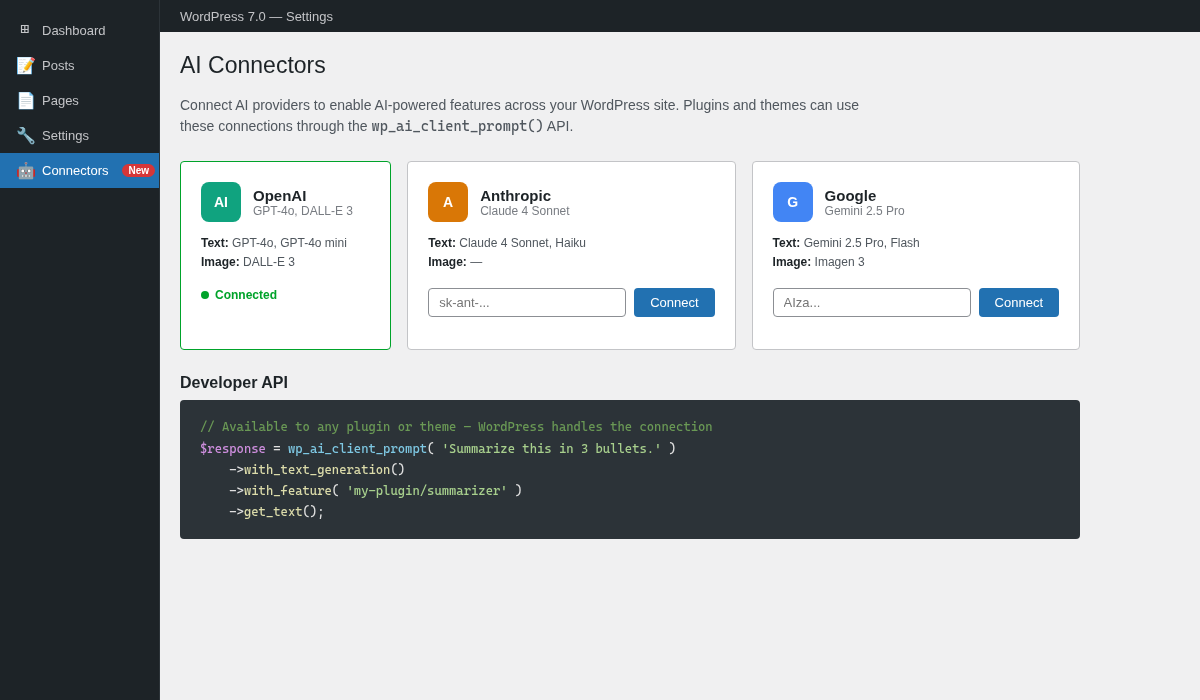
Let’s cut through the marketing. WordPress 7.0 introduces AI Connectors — a new Settings page where you plug in API keys for OpenAI, Anthropic, or Google. That’s it for the admin UI. No AI writing assistant in the editor. No content generation button. No magic “fill my site with content” feature.
The real value is under the hood. WordPress 7 ships a PHP API for developers:
$response = wp_ai_client_prompt( 'Summarize this article in 3 bullets.' )
    ->with_text_generation()
    ->with_feature( 'my-plugin/summarizer' )
    ->get_text();
This lets plugin and theme developers call AI models without building their own API integrations. Think of it like wp_remote_get() for AI — WordPress handles the connection, authentication, and provider switching. You write the prompt.
There’s also the Abilities API (introduced in 6.9), which lets WordPress describe its own capabilities to AI agents, and an MCP Adapter that exposes WordPress actions as tools for AI assistants. These are fascinating for the future of WordPress as a platform — but they’re about making WordPress controllable by AI, not about generating content within WordPress.
What Faker Studio Actually Does
Faker Studio generates structural test data. Not prose. Not blog posts that “read well.” Structural data — the kind that fills every field in your custom post types with the right type of content.
Here’s what that means in practice. Say you have a Real Estate CPT with 30 ACF fields: address, price, square footage, number of bedrooms, agent name, listing date, property type (select field), neighborhood (taxonomy), gallery images, and a relational field linking to an Agent CPT.
Faker Studio:
- Scans your field registry — ACF, JetEngine, Meta Box AIO, Pods, ACPT, ACFE, or native meta
- Detects what each field needs using 700+ multilingual regex patterns and 123 detection types
- Resolves dependencies — if the property links to an agent, Faker Studio creates agents first, then links them
- Generates 50 properties with realistic addresses, valid price ranges, proper image downloads from Unsplash/Pexels/Pixabay, and correct taxonomy assignments
All in one click. All tracked in history. All removable with one-click cleanup when you’re done.
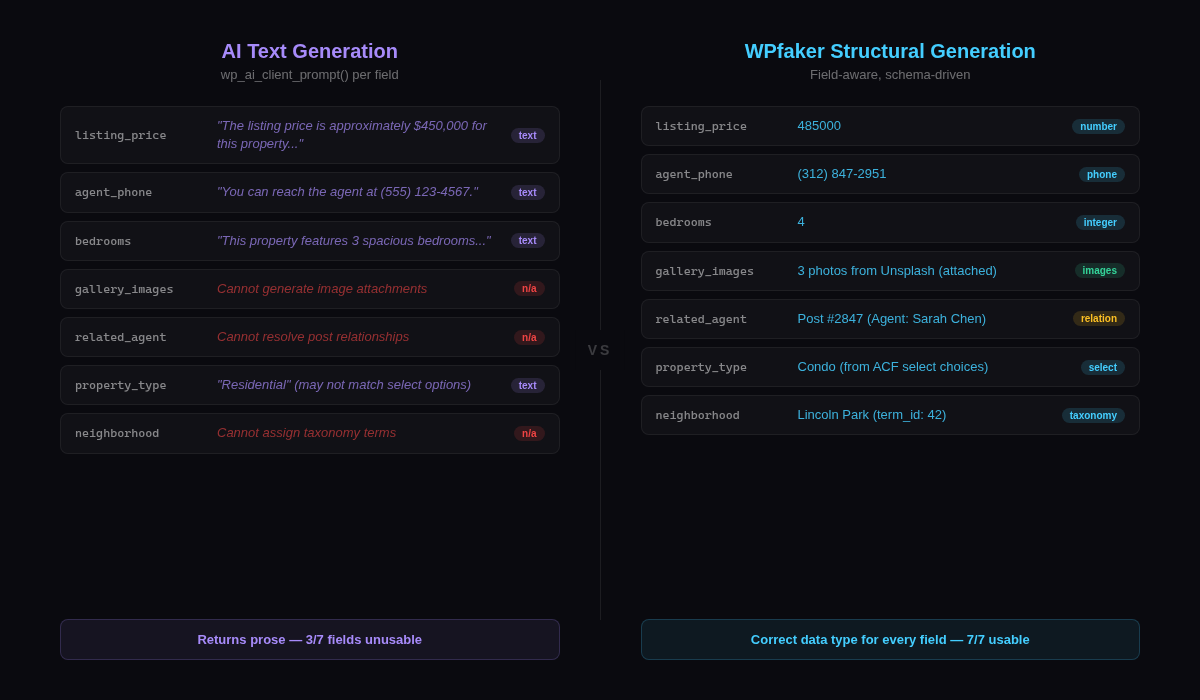
No AI model in the world does this out of the box — because it’s not a language problem. It’s a data architecture problem. The challenge isn’t writing a sentence. It’s understanding that field_agent_phone needs a phone number, field_listing_price needs a number between 100,000 and 2,000,000, and field_related_agent needs a valid post ID from the Agents CPT that was created 30 seconds ago.
The Fundamental Difference
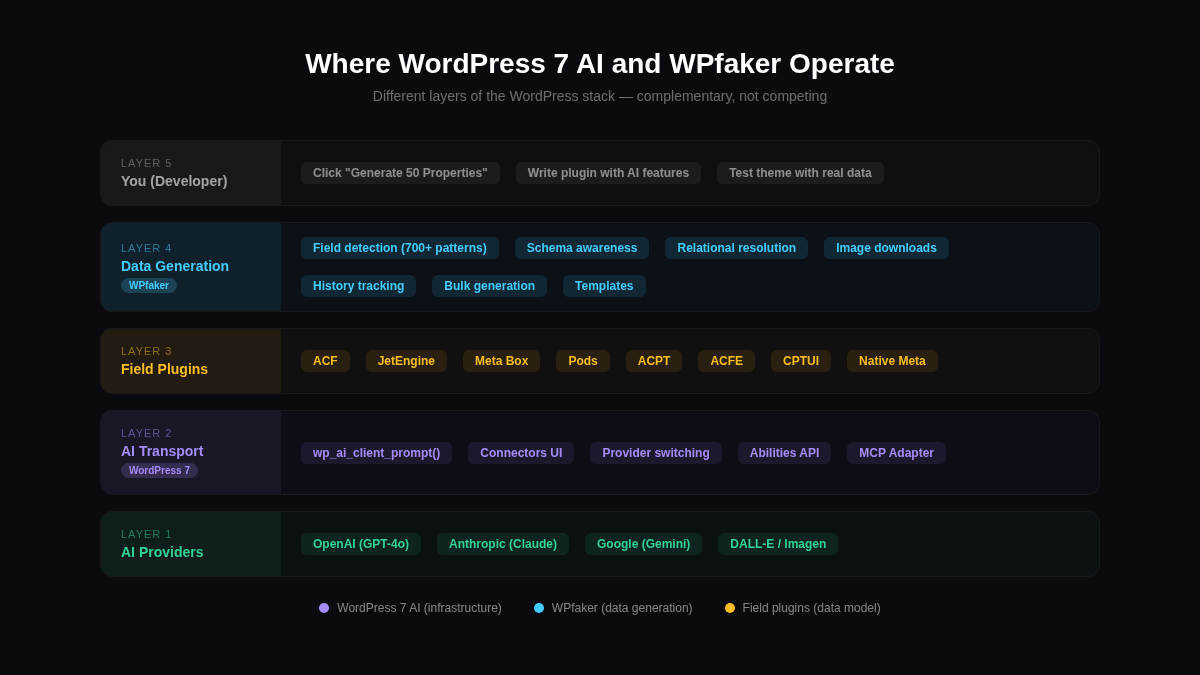
Here’s the core insight: WordPress 7 AI and Faker Studio operate on different layers of the stack.
WordPress 7 AI is a transport layer. It moves prompts from PHP to a language model and returns text. It doesn’t know about your post types, your fields, your taxonomies, or your data model. It’s plumbing.
Faker Studio is a data generation engine. It understands your WordPress schema — every registered CPT, every field group, every taxonomy, every relationship. It doesn’t need to “think” about what to put in a phone number field. It has 700+ patterns that match field names like phone, telefon, tel_number, numero_telephone across 13 languages and generates a correctly formatted number instantly.
| WordPress 7 AI | Faker Studio | |
|---|---|---|
| Purpose | Give plugins access to AI models | Generate structural test data |
| Knows your CPTs? | No | Yes — scans all registered types |
| Knows your fields? | No | Yes — 8 field plugin adapters |
| Handles relationships? | No | Yes — 3-pass dependency resolution |
| Generates images? | Only via DALL-E prompts | Downloads real photos (Unsplash, Pexels, Pixabay) |
| Tracks what it created? | No | Yes — full history with one-click cleanup |
| API costs per generation? | Yes (per token) | No (unlimited local generation) |
| Works offline? | No | Yes (except image downloads) |
This isn’t a competition. These tools don’t overlap. You could use both — Faker Studio to generate your test data, and a WordPress 7 AI-powered plugin to add AI features to that test site.
Could AI Eventually Replace Structural Test Data?
Honestly? Maybe someday. But not like you’d think.
The fantasy is: “Just tell AI to fill my WordPress site with test data.” The reality is that a language model would need to:
- Query your field registry — know every CPT, every ACF group, every JetEngine field, every Pods pod
- Understand field constraints — min/max values, allowed choices, required formats, file types
- Resolve relational dependencies — create linked posts in the right order, across multiple CPTs
- Download and attach real images — not generate AI images, but source photos that look like actual listings/products/portfolios
- Handle 13 locales — German addresses need German formatting, Japanese names need proper character sets
- Track everything — so you can remove test data without nuking your real content
- Do it consistently — every time, without hallucinating invalid post IDs or malformed dates
That’s not a prompt. That’s a purpose-built system. Which is exactly what Faker Studio is.
If you’ve compared other test data plugins, you know the gap between “generates some posts” and “fills your entire data model correctly” is enormous. We’ve covered this in our Faker Studio vs FakerPress comparison and Faker Studio vs Content Forge analysis — and the pattern is consistent. General-purpose generators hit a wall the moment your site has real complexity.
What WordPress 7 AI Means for Faker Studio Users
If anything, WordPress 7 AI makes Faker Studio more useful, not less. Here’s why:
More plugins will ship AI features. That means more complex field configurations, more custom post types, more data models to test. A plugin that adds AI-powered product recommendations? You need test products to test it. An AI summarization feature? You need realistic content to summarize. Test data is the foundation everything else runs on.
Faker Studio already has optional AI detection. When Faker Studio encounters a field it can’t pattern-match (like field_xyz_custom), it can ask OpenAI, Claude, or Gemini what type of data the field expects. This is a one-time detection cost — once Faker Studio knows the field type, it generates data locally forever. No per-generation API costs. WordPress 7 AI could eventually become another provider option for this detection step.
What to Do Next
WordPress 7’s AI Connectors are exciting infrastructure. They’ll enable a new generation of AI-powered plugins. But they won’t fill your 8 custom post types with 50 entries each, complete with ACF fields, taxonomy assignments, featured images, and relational connections.
That’s what Faker Studio is built for. It works today, offline, with zero API costs per generation — and it’ll keep working alongside whatever AI features WordPress ships next.
Frequently Asked Questions
Will WordPress 7 have a built-in content generator?
No. WordPress 7’s AI features are developer APIs — wp_ai_client_prompt() and the Connectors settings page. There is no content generation UI in core. Plugins can build on these APIs, but WordPress itself won’t generate posts or test data.
Can I use WordPress 7 AI to generate test data?
You could write a custom plugin that prompts an AI model to generate post content, but it wouldn’t handle custom fields, taxonomy assignments, relational fields, image downloads, or data cleanup. You’d be building Faker Studio from scratch — one prompt at a time, with API costs for every generation.
Does Faker Studio use AI?
Optionally. Faker Studio uses AI as a fallback for field detection — when its 700+ pattern-matching rules can’t determine a field’s purpose, it can ask an AI model. This is a one-time cost per field, not per generation. The actual data generation is always local and instant.
Will Faker Studio integrate with WordPress 7 AI Connectors?
It’s a natural fit. WordPress 7’s provider management could replace Faker Studio’s own API key configuration for AI-assisted field detection. If you’ve already configured OpenAI in WordPress 7 Settings > Connectors, Faker Studio could use that same connection. This is on the roadmap.
WordPress 7.0 release date and features based on wordpress.org/news and core development updates as of March 2026.

Written by
Michael Grossklos
WordPress developer and creator of Faker Studio. Building tools that make WordPress development faster.


