
Faker Studio vs Content Forge: AI-Powered WordPress Test Data Generation
TL;DR
Content Forge uses AI to write your content — great for blog-heavy sites that need coherent paragraphs. Faker Studio uses AI to understand your data model — one-time field detection, then unlimited generations without API costs. If your WordPress builds involve custom post types with ACF, JetEngine, or Meta Box AIO fields, Faker Studio is the better investment. If you just need blog posts that read well, Content Forge is a solid free option.
AI is everywhere now — including your WordPress test data workflow. Two plugins use AI to help you generate dummy content, but they use it in completely different ways. If you’re wondering which approach actually saves you more time, you’re in the right place.
The Problem Every WordPress Developer Knows
You need test data that looks real. Lorem Ipsum stopped being good enough years ago. Your theme demos look amateur with placeholder gibberish, and your clients can’t visualize the final product when every field says “Test Entry #47.”
But “realistic” means different things depending on your situation. Sometimes you need blog posts that actually read like blog posts. Other times you need 15 custom fields per post type filled with the right kind of data — phone numbers that look like phone numbers, prices that look like prices, dates that make sense.
That’s where these two plugins diverge. And understanding the difference will save you from picking the wrong tool. If you’ve been comparing other options too, you might also want to check our Faker Studio vs DemoPress comparison for another free alternative.
What is Content Forge?
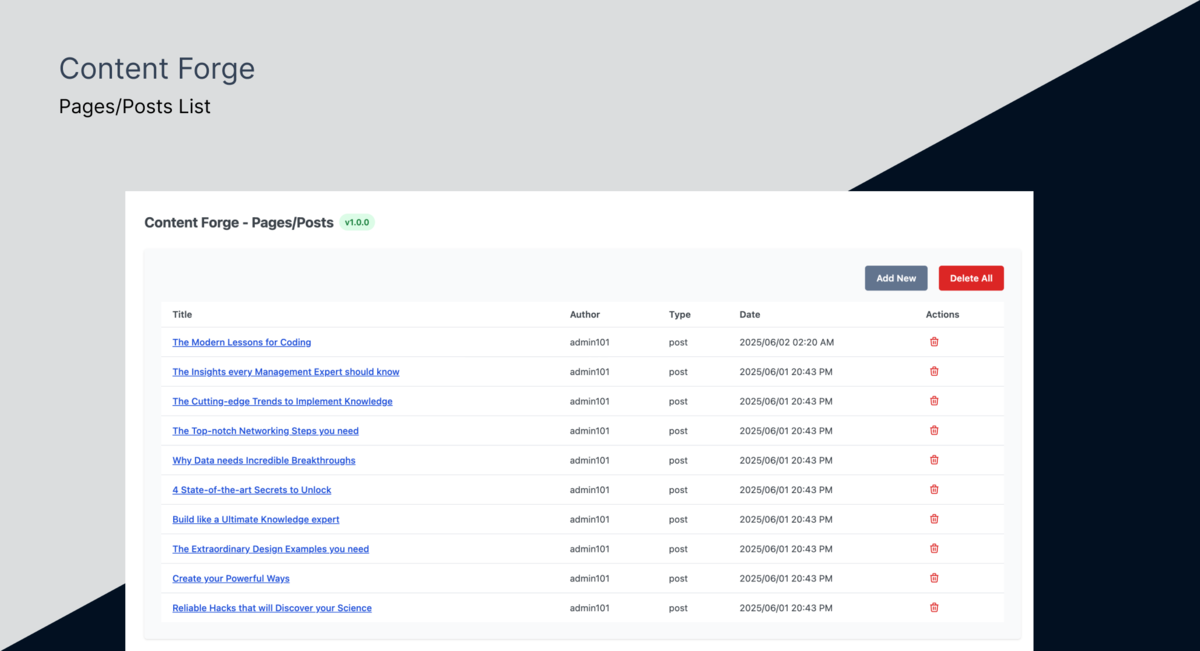
Content Forge is brand new — just over 10 active installs — but actively maintained with frequent updates. It’s free and open source.
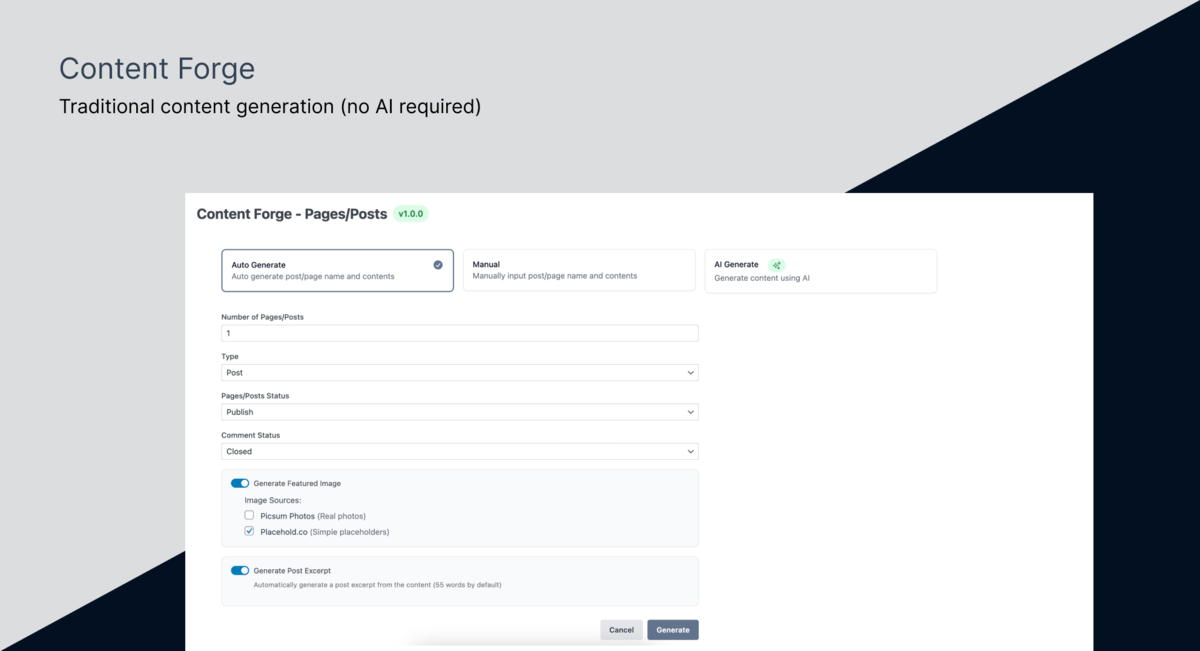
The big idea: connect it to OpenAI, Anthropic, or Google, and it generates real titles, body text, and descriptions instead of Lorem Ipsum. It also works without AI if you don’t want API keys.
It covers posts, pages, CPTs, users, taxonomies, and comments. It ships with integrations for Easy Digital Downloads, The Events Calendar, and weDocs. Featured images come from Picsum or Placehold.co. Deactivate it and it cleans up after itself.
What is Faker Studio?
Faker Studio uses AI for something completely different: understanding what your fields are, not writing what goes in them.
Here’s what that looks like in practice. Your ACF field is called company_phone. Faker Studio’s AI looks at that name, confirms it’s a phone number field, caches that detection, and then FakerPHP generates realistic phone numbers from there. One-time detection, unlimited generations. No more API calls needed.
This matters when you have a custom post type with 20 fields and names like projektbudget, ansprechpartner, or square_footage. Faker Studio figures out what each one is — once — and then generates the right kind of data every time you hit Generate. The approach scales from simple blogs all the way up to complex multi-CPT architectures with relational fields and content variations.

Feature Comparison
| Feature | Content Forge | Faker Studio |
|---|---|---|
| Price | Free | $149/year |
| Posts, Pages & CPTs | Yes | Yes |
| Users | Yes | Yes |
| Comments | Yes | Yes |
| Taxonomies | Yes | Yes |
| AI Integration | Content generation (OpenAI, Anthropic, Google) | Field detection (Gemini, OpenAI, Claude) |
| AI Required? | No (optional) | No (optional) |
| Featured Images | 2 providers (Picsum, Placehold.co) | 3 providers (Unsplash, Pexels, Pixabay) |
| ACF Support | No | Yes (Free + Pro, Repeater, Flexible Content, Gallery) |
| JetEngine / Meta Box AIO | No | Yes |
| CPT Plugin Integrations | EDD, The Events Calendar, weDocs | ACF, JetEngine, Meta Box AIO, CPTUI, ACPT |
| Field Detection Types | N/A | 119 types, 700+ patterns |
| Template System | No | Yes (with inheritance & variants) |
| Relational CPT Resolution | No | Yes (automatic 3-pass) |
| Content Variations | No | Yes (4 profiles) |
| Multilingual Patterns | No | Yes (13 languages) |
| History/Cleanup | Bulk delete | Full history with stats & safe bulk delete |
Two Approaches to AI
This is the key difference, and it’s worth getting specific about.
Content Forge’s approach: You tell it “Write me a realistic blog post about sustainable architecture.” The AI generates unique, contextual text — a real title, real paragraphs, maybe even a coherent argument. Every generation costs API tokens because the AI is doing the creative work each time.
Faker Studio’s approach: You have a field called project_budget. Faker Studio’s AI looks at that name and says “that’s a price/currency field.” That detection gets cached for an hour. From there, FakerPHP generates $45,000, $120,500, $89,900 — no further API calls. The AI understood the structure; the data library handles the rest.
So when does each approach matter to you?
Scenario 1: Content-heavy blog. You’re building a magazine theme and need 50 posts that actually read like articles. Content Forge shines here — coherent paragraphs, relevant titles, topical variety. Faker Studio generates realistic-looking text too, but it won’t write you a persuasive essay on climate policy.
Scenario 2: Custom post types with structured data. You’re building a real estate site with ACF fields for price, square footage, address, number of bedrooms, year built, and agent phone number. Faker Studio detects all of those automatically. Content Forge doesn’t have a mechanism to understand arbitrary custom fields.
Scenario 3: Multilingual projects. Your German client’s CPT has fields named telefonnummer, anschrift, and geburtsdatum. Faker Studio’s 700+ patterns across 13 languages recognize these. Content Forge would need explicit field-by-field configuration.
Scenario 4: Repeated generation cycles. You’re iterating on a theme and regenerating test data 10 times a day. With Faker Studio, the AI cost is effectively zero after the first run — field detections are cached. With Content Forge, each generation cycle sends new requests to the AI provider.
For a simple portfolio site with standard post types? Either works fine. For developer-oriented tools in this space, our Faker Studio vs Easy Populate Posts comparison covers another angle.

Custom Fields: The Gap
This is where your choice probably gets made for you.
Content Forge integrates with specific plugins — EDD, The Events Calendar, weDocs. If you use one of those, it knows exactly what data to generate for their custom fields.
Faker Studio integrates with field frameworks — ACF, JetEngine, Meta Box AIO. The difference matters. Content Forge works great if you happen to use one of its supported plugins. Faker Studio works with any custom post type that uses ACF or Meta Box AIO — which covers most of the WordPress ecosystem.
Your bespoke real estate listing CPT with 30 ACF fields? Faker Studio handles that. Your events directory with JetEngine meta and relational fields? Also handled. ACF Repeater fields, Flexible Content layouts, Gallery fields — Faker Studio fills these with structurally correct data and resolves relational fields across post types using its automatic 3-pass system.
Image Quality
Content Forge pulls from Picsum and Placehold.co — functional, but placeholder-style. Faker Studio connects to Unsplash, Pexels, and Pixabay for real photography.
This matters more than you’d think. When you’re presenting a theme demo to a client, real photos sell the vision. Placeholder squares don’t. And with three providers to choose from, you’re less likely to hit rate limits during large generation runs.
Where Content Forge Shines
Let’s be honest about what Content Forge does well.
It’s free. Zero-dollar price tag removes all friction. Install, generate, done.
AI-written content is genuinely useful. If you’re building a content-heavy site — a blog, news theme, or knowledge base — having the AI write actual coherent text is a real advantage. The posts read like posts.
Built-in plugin integrations are thoughtful. EDD and Events Calendar support means it understands those data models out of the box.
Clean uninstall is a nice touch. Deactivate Content Forge and it removes what it created.
For a comparison with another free option in this space, see our Faker Studio vs FakerPress breakdown — FakerPress takes yet another approach to the same problem.
Where You’ll Outgrow Content Forge
Content Forge starts showing its limits in three specific scenarios.
Complex data architectures. The moment you move beyond standard posts into custom post types with 10+ custom fields, Content Forge lacks the framework to populate them. There’s no ACF integration, no Meta Box AIO support, no JetEngine awareness. Your fields stay empty.
High-volume generation cycles. If you’re regenerating test data repeatedly during development — which most theme and plugin developers do — the cumulative AI API cost adds up. Each cycle sends fresh requests. Faker Studio’s cached detection means the second, third, and fiftieth generation cost nothing in API tokens.
Professional client demos. Between placeholder images (Picsum) and the absence of a template system, Content Forge doesn’t give you the polish needed for client-facing demos. No saved templates, no content variations, no real photography — you’re starting from scratch each time.
The Real Difference
Here’s the insight that makes the choice clear: Content Forge treats AI as a content writer. Faker Studio treats AI as a field analyst.
Content Forge asks the AI “What should this post say?” every single time. Faker Studio asks the AI “What type of data does this field need?” exactly once. For a blog, the content-writer approach is natural. For professional WordPress development with structured data? The field-analyst approach pays for itself on the first complex project.
What Happens Next
Both plugins are pushing this category forward with AI, and that’s good for everyone.
Content Forge is worth watching as it matures. It’s free, it’s actively developed, and AI-written content is a genuinely useful feature for content-focused sites. If your workflow is mostly standard posts and pages, it gives you realistic text without any cost.
Faker Studio’s detection-based AI is a different bet — understand the data model once, generate correctly every time. That bet pays off most when your WordPress builds are field-heavy and structurally complex, which is where most professional WordPress development lives today.

The honest answer? They solve different problems. Pick the one that matches yours.
See Faker Studio pricing and start your free trial
Frequently Asked Questions
Does Content Forge need an API key?
No — it falls back to basic placeholder text without one. But you need an OpenAI, Anthropic, or Google API key to unlock its main feature: AI-written content. Without the key, you lose the advantage that sets it apart from simpler generators.
Can Content Forge generate ACF fields?
No. Content Forge integrates with specific plugins (EDD, The Events Calendar, weDocs) but cannot populate arbitrary ACF field groups, JetEngine, or Meta Box AIO fields. If your project relies on ACF for structured data, Faker Studio handles all ACF field types automatically.
Which AI approach is cheaper for WordPress test data?
Faker Studio’s cached detection is significantly cheaper over time. It identifies each field type once and generates data via FakerPHP with zero ongoing API cost. Content Forge sends fresh AI requests every generation cycle. For repeated regeneration during development, Faker Studio saves considerably on API fees.

Written by
Michael Grossklos
WordPress developer and creator of Faker Studio. Building tools that make WordPress development faster.


